Pricing pages rarely capture what a multi-account workspace really costs a team. This guide separates the visible subscription from the operational costs, then gives you a short framework for comparing options honestly without guessing any vendor's numbers.
Why pricing evaluation matters for multi-account teams
When a team compares multi account browser pricing, the temptation is to rank plans by a monthly number and stop there. In practice the larger costs sit elsewhere: the hours spent rebuilding profiles after a device change, the time a new operator needs before they can work safely, and the rework caused by a proxy mapping nobody wrote down. A pricing framework that ignores those items will pick the wrong tool for a team that runs dozens of accounts.
Most agency operations leads do not set out to solve pricing evaluation as a standalone project. It appears as a side effect of growth: another storefront, another client workspace, another campaign login. Once several people touch the same set of accounts, the small habits that worked for a handful of profiles stop being reliable, and evaluating multi account browser pricing becomes part of the operating routine rather than an occasional task.
The underlying issue is state. Cookies, cached assets, local storage, saved bookmarks and extension data all persist between visits, and a conventional browser assumes that persistence is helpful. For a team running many accounts in parallel, the same persistence creates ambiguity about which context is active. Treating pricing evaluation as a documented workflow removes that ambiguity before it turns into rework.
- One isolated profile per account, with separate cookies, cache, local storage and bookmarks.
- One recorded proxy route per profile, reviewed whenever the account's region changes.
- Role-based permissions that match what each teammate actually does.
- Cloud sync so the workspace does not depend on a single laptop.
- Batch launch to remove repetitive opening and closing of profiles.
- A written owner for every account and a short handover note.
A short definition
For this guide, pricing evaluation means the documented set of conventions that keep browsing state, network routes and human permissions attached to the right account. It is a process, not a single setting.
Defining it this way makes the rest of the article testable: each section below describes something you can check in a workspace rather than a claim you have to take on trust.
- One isolated profile per account, with separate cookies, cache, local storage and bookmarks.
- One recorded proxy route per profile, reviewed whenever the account's region changes.
- Role-based permissions that match what each teammate actually does.
What to verify during a free trial
MetaDesk offers free registration, which makes it possible to test the workspace against a real workflow before any commercial discussion. The useful question during that trial is not how many features a plan unlocks, but how quickly a teammate can launch the right profile with the right network route and the right permissions. Any figure you cannot confirm on an official pricing page should stay out of your comparison.
Decide in advance what would count as a failure. If a new teammate cannot launch the right profile without help, or if isolation does not hold after a restart, no amount of extra features compensates. Writing the failure conditions first prevents a pleasant interface from overriding a missing essential.
Invite a colleague into the trial. Solo testing rarely exposes permission and handover problems, which are exactly the issues that appear once a team starts using the workspace daily.
- Use two real accounts and one realistic task.
- Invite a colleague to expose permission problems.
- Write the failure conditions before you start.
- End with a written decision and one line of evidence per criterion.
- Pick two real accountsUse accounts from your actual workflow so the trial tests something you will repeat every day, not a demo scenario.
- Run the setup sequenceCreate two profiles, attach one proxy route each, save a distinct bookmark in both, and enable cloud sync.
- Invite a colleague with limited rightsCheck that role-based permissions let them launch a profile without exposing edit or export rights they do not need.
- Perform a handover on a second deviceSign in from another machine and confirm the profiles, routes and settings arrive intact through sync.
- Record the decisionWrite adopt, extend or reject, with one sentence of evidence for each criterion you weighted earlier.
Recording the result
A one-page note is enough: criteria, weight, observed result, source and decision. Write it on the day of the trial, while the details are still fresh.
Keep the note with the access policy. When the team revisits pricing evaluation next quarter, that record is far more useful than a remembered impression.
- Use two real accounts and one realistic task.
- Invite a colleague to expose permission problems.
- Write the failure conditions before you start.
How to evaluate options for pricing evaluation
Any criterion that cannot be checked in a trial belongs in the 'confirm on official docs' column. That includes plan limits, data residency details and export formats. Keeping those separate from observed behaviour is what makes a review honest and reusable next year.
For pricing evaluation, the decisive rows are usually the boring ones: what isolation actually separates, whether sync preserves settings across devices, and how quickly a new teammate can work without help.
- Weight criteria before looking at any product.
- Confirm plan limits and prices only on official pages, with the date noted.
- Use the same two-account trial script for every candidate.
- Separate observed behaviour from documented claims.
- Do not copy competitor specifications you cannot verify.
| Criterion | What to verify | Where to confirm |
|---|---|---|
| Session isolation | Cookies, cache, local storage and bookmarks are separate per profile | Two-account trial and official docs |
| Cloud sync | Profiles and settings appear unchanged on a second device | Handover test on another machine |
| Roles and permissions | Launch, edit and export rights can be granted separately | Official docs plus a colleague in the trial |
| Batch management | A group of profiles can be launched and updated together | Timed batch-launch test |
| Per-profile proxy | Each profile keeps its own recorded network route | Configuration screen and mapping table |
| Platform support | Windows and macOS clients share the workspace model | Official download and version notes |
| Export and recovery | A profile export can be restored after a device change | Scheduled restore test |
| Commercial terms | Current plans, limits and prices | Official pricing page, with the date checked |
Keeping the review honest
Write the source next to every score. 'Observed in trial', 'confirmed on official documentation on this date' and 'unverified' are three very different answers, and conflating them is how a comparison quietly becomes marketing.
If a candidate cannot be tested for a criterion, leave the row blank rather than filling it with an assumption. A blank row is a useful to-do; a guessed score is a future correction.
- Weight criteria before looking at any product.
- Confirm plan limits and prices only on official pages, with the date noted.
- Use the same two-account trial script for every candidate.
Understanding cost without guessing prices
Cost discussions go wrong when they compare only subscription lines. For a multi-account team, the larger expenses are usually time: onboarding a new operator, correcting a bad proxy mapping, recovering a profile after a device change, and reviewing permissions. Put those on the same page as any fee.
We do not quote prices for other vendors, and we do not invent plan tiers. Confirm any commercial figure on the official pricing page and record the date you checked it. Everything else in the comparison should be a cost you can measure in your own team.
- Include onboarding, handover, recovery and review time.
- Confirm any fee on the official pricing page and note the date.
- Revisit the estimate after two months with real numbers.
- Keep the model short enough to maintain quarterly.
| Cost driver | Why it matters | How to measure |
|---|---|---|
| Onboarding time | Every new teammate repeats it | Minutes to first correct launch |
| Proxy routes | A route is needed for every profile | Confirmed provider costs and route count |
| Handover and review | Shared work needs written rules | Hours per month in the access policy review |
| Recovery | Device changes and mistakes happen | Minutes per restore test |
| Subscription | Visible but often not the largest item | Official pricing page, with the date checked |
Revisiting the estimate
After two months, replace estimated hours with measured ones and mark which assumptions were wrong. The gaps are usually where the real operational cost was hiding.
Review the model quarterly rather than continuously. A stable, slightly rough number supports decisions better than a precise one that nobody maintains.
- Include onboarding, handover, recovery and review time.
- Confirm any fee on the official pricing page and note the date.
- Revisit the estimate after two months with real numbers.
Pre-scale checklist for pricing evaluation
Scaling exposes whatever was informal. A convention that worked for eight profiles usually survives on memory; the same convention across eighty profiles needs to be written down and checked. Use the list below as a gate before adding the next batch of accounts.
If a row fails, fix it before continuing. The cost of pausing a rollout for an hour is small compared with unpicking a naming or permission mistake across a full workspace.
- Every profile has a name following the documented convention.
- Every profile has a recorded owner and second-factor holder in your policy.
- Every profile has one proxy route, and the mapping has been reviewed this month.
- Roles follow least privilege, with exceptions recorded and dated.
- Cloud sync is enabled and a scheduled export has been restored once.
- Isolation was verified with two profiles launched together.
- A joiner and leaver checklist exists and has been used at least once.
| Check | What good looks like | Owner |
|---|---|---|
| Naming convention | Every profile follows client-brand-platform-role | Workspace admin |
| Proxy mapping | One route per profile, reviewed this month | Account owner |
| Permissions | Least privilege, exceptions dated and owned | Team lead |
| Sync and export | Sync on, export scheduled, restore tested | Workspace admin |
| Isolation | Two-profile launch shows no shared state | Operator |
Making the review stick
Put the checklist in the same place as the access policy and give it a recurring owner. A checklist that depends on someone remembering to open it will be opened twice.
Keep failed rows visible until they are fixed. Hiding them makes the review feel complete while the underlying pricing evaluation problem remains.
- Every profile has a name following the documented convention.
- Every profile has a recorded owner and second-factor holder in your policy.
- Every profile has one proxy route, and the mapping has been reviewed this month.
Step-by-step: evaluating multi account browser pricing
Before touching settings, decide what 'done' means for a profile in your team. A workable definition is: named, owned, routed, permissioned, synced and verified. Anything missing from that list is a follow-up task, not a cosmetic detail.
The sequence below follows that definition. It is deliberately short and deliberately boring, because pricing evaluation should be a repeatable procedure rather than a one-off project with a heroic owner.
- Keep the step order fixed so every operator produces the same result.
- Write decisions into the access policy as you make them.
- Pilot with ten accounts before scaling to the full set.
- Define what a finished profile looks like before you start.
- Define the naming conventionWrite a pattern such as client-brand-platform-role and apply it to every profile. A readable name is what makes a large workspace navigable.
- Create one profile per accountAdd each account as its own isolated session so cookies, cache, local storage and bookmarks stay separate from day one.
- Attach a proxy route to each profileAssign the network route that matches the account's region and record the mapping in your access policy rather than in memory.
- Record ownership and permissionsName the account owner and the second-factor holder in your own policy, then invite teammates with the minimum role they need.
- Enable sync and schedule an exportTurn on cloud account sync for portability and set a recurring profile export for recovery. Test a restore at least once.
- Batch launch and verify isolationLaunch a small group together, confirm that saved state does not cross over, and only then add the remaining accounts.
After the pilot
Once ten profiles pass the verification step, clone the conventions rather than the profiles. Each new account still gets its own session, route and owner; only the pattern is copied.
Re-run the isolation check after any client update or device change. It takes two minutes and catches the configuration drift that otherwise surfaces during a busy working session.
- Keep the step order fixed so every operator produces the same result.
- Write decisions into the access policy as you make them.
- Pilot with ten accounts before scaling to the full set.
Metrics that show whether pricing evaluation is working
It is easy to declare a rollout finished and never measure it. A handful of simple numbers tells you whether pricing evaluation actually changed daily work or merely added a new tool. Collect a baseline before the change, then repeat the same measurements two weeks later.
Keep the set small. Four metrics that someone will actually record beat twelve that nobody opens. The table below uses measures you can time with a stopwatch and count in the workspace, without any instrumentation project.
- Measure a baseline before changing anything.
- Prefer rates and times over raw counts.
- Ask operators what still feels confusing each week.
- Repeat the same measurement two weeks after rollout.
| Metric | What to compare | How to collect |
|---|---|---|
| Time to first correct launch | New teammate before vs after rollout | Stopwatch during onboarding |
| Profiles with a recorded owner | Percentage of total profiles | Monthly workspace review |
| Mapping reviews completed | Percentage of routes reviewed this month | Mapping table with dates |
| Handovers needing help | Count per week | Short weekly team note |
| Recovery time | Minutes to restore a profile from export | Scheduled restore test |
What a good baseline looks like
A baseline does not need to be precise. Time one onboarding session, count how many profiles have a recorded owner, and note how many handovers needed help last week. Three rough numbers are enough to show whether the change helped.
Keep the same definitions at the follow-up. If you change what counts as a handover between measurements, the comparison tells you nothing about pricing evaluation.
- Measure a baseline before changing anything.
- Prefer rates and times over raw counts.
- Ask operators what still feels confusing each week.
When to change the process
If two weeks of measurement show no improvement, look at the step people skip rather than the tool. In most teams that is the ownership record or the proxy mapping, and both are documentation problems with documentation fixes.
Change one thing at a time and measure again. Stacking several process changes at once makes the next result impossible to interpret.
- Measure a baseline before changing anything.
- Prefer rates and times over raw counts.
- Ask operators what still feels confusing each week.
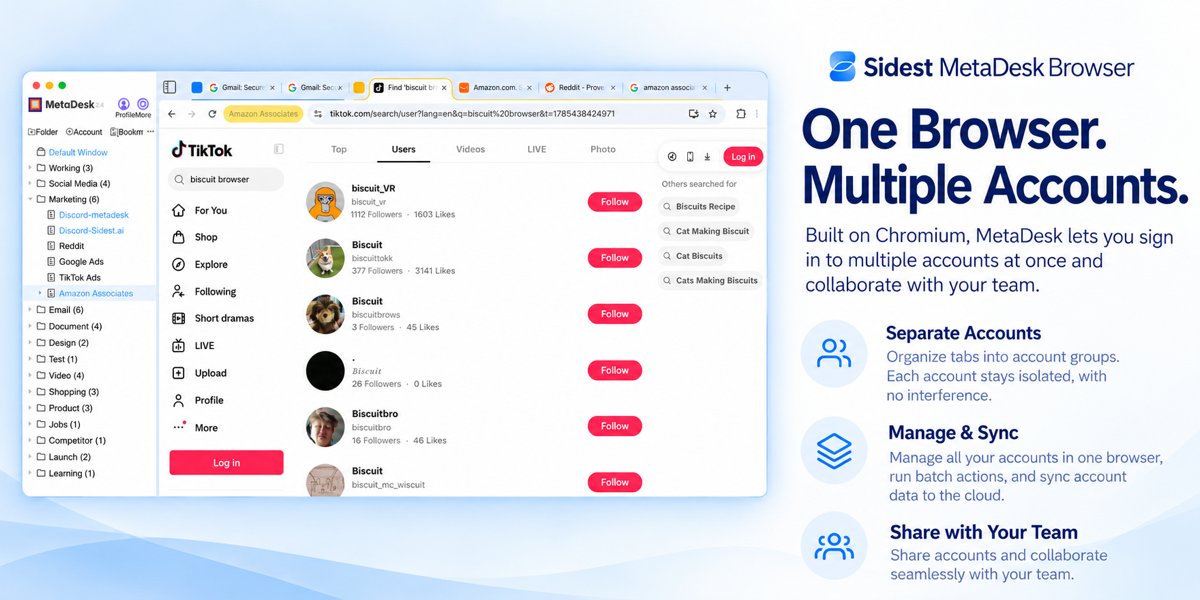
See it in action

Frequently asked questions
Is pricing evaluation difficult to set up for a small team?
Start with two profiles and a short naming convention. Create one profile per account, attach one proxy route to each, enable cloud sync and invite a colleague with limited permissions. Once that small set passes an isolation check, extend the same pattern with batch launch and management.
Does MetaDesk Browser (Sidest Browser) support both Windows and macOS?
Yes. MetaDesk provides Windows and macOS clients that share the same workspace model, so profiles, cloud sync and role-based permissions behave consistently across a mixed-device team. Use the official installer for each platform and keep clients updated together.
Can teammates share a workspace without mixing account state?
Yes. Every account runs in an isolated session with separate cookies, cache, local storage and bookmarks. Team collaboration adds roles on top of that isolation, so a colleague can launch a profile without inheriting another account's saved state.
What should be written down before a rollout?
At minimum: the profile naming convention, one proxy route per profile, the owner and second-factor holder for each account, the role definitions, and the joiner and leaver steps. Six lines of documentation prevent most of the rework described in this guide.
Is there a free way to try pricing evaluation?
Yes. MetaDesk offers free registration, so you can build a small workspace with a couple of real accounts and test isolation, cloud sync, batch launch and permissions before making any commitment. Confirm current plan details on the official pricing page.
Does MetaDesk offer a free way to start?
Yes. MetaDesk offers free registration, so you can create a workspace and test isolated profiles, cloud sync and team roles before deciding anything. For current plan details, tiers and usage limits, consult the official pricing page rather than third-party summaries, which go stale quickly.
Which hidden costs should a pricing comparison include?
Include onboarding time per teammate, the cost of per-profile proxy routes, the effort of exporting and restoring profiles, and the time spent on permission reviews. These are real operating costs even when they never appear on an invoice, and they usually dominate the comparison once a team passes twenty profiles.
Put this workflow into practice
One Chromium workspace, isolated profiles for every account, and a team that can actually share them.